
Last updated on
Sep 27, 2026

Get the free WSIB Medication Reimbursement Form
We are not affiliated with any brand or entity on this form

Fill out
Complete the form online in a simple drag-and-drop editor.

eSign
Add your legally binding signature or send the form for signing.

Share
Share the form via a link, letting anyone fill it out from any device.

Export
Download, print, email, or move the form to your cloud storage.
Why pdfFiller is the best tool for your documents and forms


End-to-end document management
From editing and signing to collaboration and tracking, pdfFiller has everything you need to get your documents done quickly and efficiently.
Accessible from anywhere
pdfFiller is fully cloud-based. This means you can edit, sign, and share documents from anywhere using your computer, smartphone, or tablet.
Secure and compliant
pdfFiller lets you securely manage documents following global laws like ESIGN, CCPA, and GDPR. It's also HIPAA and SOC 2 compliant.
What is WSIB Reimbursement Form
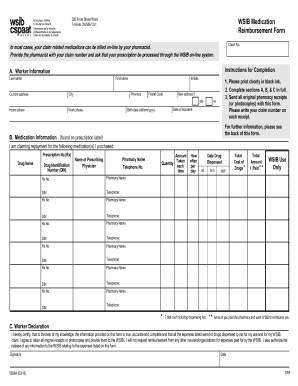
The WSIB Medication Reimbursement Form is a medical billing document used by workers in Ontario, Canada, to claim reimbursement for medication expenses related to a WSIB claim.
pdfFiller scores top ratings on review platforms




Who needs WSIB Reimbursement Form?
Explore how professionals across industries use pdfFiller.

WSIB Reimbursement Form is needed by:
-
Workers in Ontario seeking medication reimbursement for WSIB claims
-
Healthcare professionals involved in WSIB-related claims
-
Employers looking to assist employees with reimbursement processes
-
WSIB claims administrators reviewing medication claims
-
Support staff handling medical billing for workers' compensation
Comprehensive Guide to WSIB Reimbursement Form
What is the WSIB Medication Reimbursement Form?
The WSIB Medication Reimbursement Form is essential for workers in Ontario, Canada, seeking to claim medication expenses related to their WSIB claims. This form plays a critical role in facilitating the reimbursement process, ensuring that workers can recover costs associated with necessary medications. The process involves filling out the form accurately, attaching required documents, and submitting it for review and reimbursement.
To begin the process, workers must complete the form by providing personal details and medication information, followed by submission to the WSIB for evaluation.
Purpose and Benefits of the WSIB Medication Reimbursement Form
The primary purpose of the WSIB Medication Reimbursement Form is to help workers reclaim costs incurred for medication linked to workplace injuries. By using this form, workers can navigate the process of obtaining financial relief, which serves to alleviate the burden of health-related expenses during recovery. This support is vital for ensuring that individuals receive the care they need without excessive financial strain.
Some of the key benefits of completing this form include:
-
Financial assistance for medical expenses.
-
Streamlined submission process for claims.
-
Support for health maintenance during recovery.
Who Needs the WSIB Medication Reimbursement Form?
This form is specifically designed for workers in Ontario who have sustained injuries that require medication as part of their recovery. Eligible workers must be involved in the WSIB claims process to utilize this form effectively. Understanding the criteria for eligibility is crucial before submission to ensure that the assistance can be received without delays.
Eligibility generally includes factors such as:
-
Having an approved WSIB claim.
-
Incurred expenses related to necessary medications.
How to Fill Out the WSIB Medication Reimbursement Form Online
Completing the WSIB Medication Reimbursement Form using pdfFiller is straightforward. Follow these step-by-step instructions to ensure accuracy:
-
Access the WSIB form on pdfFiller.
-
Fill in your personal information accurately, including your name, address, and contact details.
-
Detail the medications for which you are claiming reimbursement.
-
Ensure to provide the required signature to validate your submission.
-
Review the completed form for accuracy before submission.
Required Documents and Supporting Materials for Submission
When submitting the WSIB Medication Reimbursement Form, it’s crucial to include all necessary documentation to support your claim. This ensures that your request is processed smoothly and effectively. The essential documents typically required include:
-
Original pharmacy receipts.
-
Any relevant medical records or prescriptions.
-
Additional documentation that may enhance the credibility of your claim.
Submission Methods for the WSIB Medication Reimbursement Form
Workers can submit the completed WSIB Medication Reimbursement Form through various methods, such as online submission or via traditional mail. Each submission method has its implications on processing times:
-
Online submission often leads to quicker processing times.
-
Mail submissions can incur delays based on postal service efficiency.
Choosing the method that best suits your situation can impact the speed of your reimbursement.
What Happens After You Submit the WSIB Medication Reimbursement Form?
Once your WSIB Medication Reimbursement Form has been submitted, the next steps involve verification and processing by WSIB officials. You can anticipate receiving notifications regarding the status of your claim. Typically, you will be informed about:
-
The expected processing time for your reimbursement.
-
Any additional information needed for your claim.
Addressing potential issues proactively can help alleviate concerns during this phase.
Common Errors and How to Avoid Them When Filing
Workers often encounter common pitfalls while filling out the WSIB Medication Reimbursement Form. To minimize mistakes, consider these tips:
-
Double-check all personal information, ensuring accuracy.
-
Verify that all required documents are attached before submission.
A checklist can be beneficial in making certain that you meet all requirements prior to submitting your form.
Security and Compliance for Handling the WSIB Medication Reimbursement Form
Maintaining security is paramount when handling the WSIB Medication Reimbursement Form. pdfFiller employs stringent security measures, including 256-bit encryption, to protect sensitive information during the submission process. Compliance with regulations such as HIPAA is also adhered to, providing peace of mind when disclosing personal health details.
Start Filling Out the WSIB Medication Reimbursement Form with pdfFiller
Utilizing pdfFiller for completing the WSIB Medication Reimbursement Form presents various benefits. The platform streamlines the process, making it easier to fill out fields accurately while ensuring maximum security for your personal information. With its user-friendly interface and efficient features, pdfFiller allows you to focus on recovery without unnecessary complications.
How to fill out the WSIB Reimbursement Form
-
1.Access the WSIB Medication Reimbursement Form on pdfFiller by searching for the form name in the search bar or by navigating to the provided link.
-
2.Once the form loads, utilize pdfFiller's interface to navigate through fillable fields. Click on each field to enter information smoothly.
-
3.Before filling out the form, gather necessary information such as personal details, medication details, and original pharmacy receipts.
-
4.Start entering your information by filling out your last name, first name, initials, and current address in the designated fields.
-
5.Provide your home phone and work phone numbers accurately to ensure WSIB can contact you if needed.
-
6.Enter your birth date, the date of the accident, and ensure you double-check for any typing errors.
-
7.Fill in the medication details using the checkboxes and tables provided, indicating all medications related to your WSIB claim.
-
8.Once you've filled out all sections, review your form thoroughly for accuracy and completeness, ensuring no fields are left unfilled.
-
9.After reviewing, sign and date the form where indicated, as a signature is required for processing.
-
10.Finally, save your completed form on pdfFiller, and use the download button to save it as a PDF file or submit it directly through pdfFiller via the submission feature.

Who is eligible to use the WSIB Medication Reimbursement Form?
Workers in Ontario who have incurred medication expenses related to a WSIB claim are eligible to use the WSIB Medication Reimbursement Form to seek reimbursement.
What supporting documents do I need to submit with the form?
You must provide original pharmacy receipts along with your WSIB Medication Reimbursement Form to validate the medication expenses claimed.
How do I submit the WSIB Medication Reimbursement Form?
You can submit the completed WSIB Medication Reimbursement Form by mailing it to the WSIB office or through electronic submission via pdfFiller if applicable.
Are there deadlines for submitting the reimbursement form?
It is essential to submit your WSIB Medication Reimbursement Form as soon as possible after incurring expenses to ensure timely processing of your reimbursement claim.
What common mistakes should I avoid when filling out the form?
Ensure you do not leave any required fields blank, double-check your information for accuracy, and make sure your receipt details match the medications listed on the form.
How long does it take to process the reimbursement once submitted?
Processing times can vary, but generally, it may take several weeks for the WSIB to review your submitted medication reimbursement form and release payment.
Is notarization required for the WSIB Medication Reimbursement Form?
No, the WSIB Medication Reimbursement Form does not require notarization; however, be sure to sign it where indicated before submission.
Related Content
Related Forms



Related Catalogs
Get the latest insights from our blog


If you believe that this page should be taken down, please follow our DMCA take down process
here
.
This form may include fields for payment information. Data entered in these fields is not covered by PCI DSS compliance.